Fluctuating Hydrodynamics
We refer to fluctuating hydrodynamics as the Navier-Stokes equations coupled with particles in a Force Coupling Method fashion. The algorithms for most UAMMD solvers for fluctuating hydrodynamics are laid out in [1] [2] and [3]. In general, we can write the Navier-Stokes equation as:

- Where:
 : Fluid density.
 : Fluid velocity.
 : Fluid momentum.
 : Deterministic stress tensor
 : Pressure.
 : Any external fluid forcing, typically
  , the spreaded particle forces.
 : I call this the kinetic tensor.
 : Fluctuating stress tensor.
Depending on the particular solver, some terms might be zero. For instance, if the solver is incompressible, the term  vanishes and the density is constant.
When inertia is disregarded the equations fall back to the Stokes equations, UAMMD offers solvers for this regime, referred to as Brownian Hydrodynamics. Not that in any case we disregard particle inertia (i.e the particles follow the local fluid exactly).
- In particular, UAMMD offers fluctuating hydrodynamics solvers in two regimes:
Incompressible: Incompressible Inertial Coupling Method.
Compressible: Compressible Inertial Coupling Method.
Some solvers use a staggered grid, it is worth introducing it here:
About Staggered grids
In a staggered grid each quantity kind (scalars, vector or tensor elements) is defined on a different subgrid. Scalar fields are defined in the cell centers, vector fields in cell faces and tensor fields are defined at the centers and edges.
Let us denote a certain scalar field with  , a vector field with
  (with components
  ) and a tensor field with
  (with components
 ).
).
Say  represents a cell in the grid, which is centered at
the position
represents a cell in the grid, which is centered at
the position  . Then, the different fields, corresponding to cell
would be defined at the following locations:
. Then, the different fields, corresponding to cell
would be defined at the following locations:



Where  and
and  are the unit vectors in those directions and
  is the size of a cell. From now on a superindex denotes a coordinate and a subindex denotes a physical position in space. To be more explicit the component
  of the velocity,
  of cell is defined at the position
  , which is to be understood as “the location of the center of cell plus
  in the direction”.
These rules result in the values assigned to a cell sometimes being defined in
strange places. The sketch below represents all the values owning to a certain
cell, (with center defined at ○). Unintuitively, some quantities assigned
to cell lie in the neighbouring cells (represented below is also the cell to its right).
            <------h---->
+-----⬒-----▽-----------+
|           |           |
|           |           |
|     ○     ◨     △     |
|           |           |
|           |           |
+-----------+-----------+
- Where each symbol represents:
○:
 (Cell center, at
  )
)◨:

⬒:

△:

▽:

Naturally, this discretisation requires special handling of the discretized versions of the (differential) operators. See for instance ICM_Compressible/SpatialDiscretization.cuh to see how UAMMD deals with them.
For instance, multiplying a scalar and a vector requires interpolating the scalar at the position of the vector (Since the result, being a vector, must be defined at the vector subgrids). One example of this is computing the momentum:

The differential operators are discretized via finite differences.
For instance, the gradient of an scalar is a vector. Lets say we want to compute the  component of the density gradient at cell :

The result is defined at the location  . The rest of the operators follow a similar pattern, where in order to map from one space to another (like when going from scalars to vector in the above example) we have to make sure that the result is defined at the right location.
For more information, check out [1], [3] or Raul’s manuscript.
Compressible Inertial Coupling Method
In the compressible inertial coupling method we employ a staggered grid for the spatial discretization of the Navier-Stokes equations.
Particles dynamics are integrated via a predictor-corrector Euler scheme (forces are only computed once). By default, the particle-fluid coupling is mediated via a three point Peskin kernel.
The algorithm is described in detail in Appendix A of [1] or in [3]. Check the files under ICM_Compressible for detailed information about the solver.
This solver is triply periodic, although walls and such could be included.
In order to evaluate the pressure we use a provided equation of state, by default  .
.
Both of the Navier-Stokes equations can be written as a conservation equation
with the following form: 
Where  might be the density or the fluid velocity and
  are three different time points inside a time step (we use a third order Runge Kutta integrator).
In order to go from the time step
are three different time points inside a time step (we use a third order Runge Kutta integrator).
In order to go from the time step  to
to  the solver must be called three times for the density and then the velocity:
,
and
,
and
,
and


The values of  and
and  allow to choose between different temporal discretizations.
- The current implementation uses, for each subtime respectively:



In both cases, we can define  .
.
Where  means one thing or another depending on the equation we are solving. is only non-zero for the velocity.
 represents the fluctuating stress tensor ( above), which are defined as:
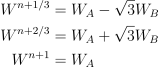
Where  and
and  are uncorrelated Gaussian random 3x3 tensors defined as:

Where  is a symmetric 3x3 tensor with

The solver is described in more detail in Appendix A of [1].
Other substepping schemes might be used with slight modifications to this code (see Florencio Balboa’s Ph.D manuscript)
- The overall algorithm, including the particles (which are included via the Immersed Boundary Method), can be summarized as:
Take particles to mid step:
 .
.Update the fluid densities and velocities using the Runge Kutta algorithm above to get
 . Here we use
  .
.Update particle positions to next step:
 .
.
Boundary conditions via ghost cells
The boundary conditions are implemented using ghost cells. Since none of the operators require searching for a value beyond first neighbours we can use a single layer of ghost cells.
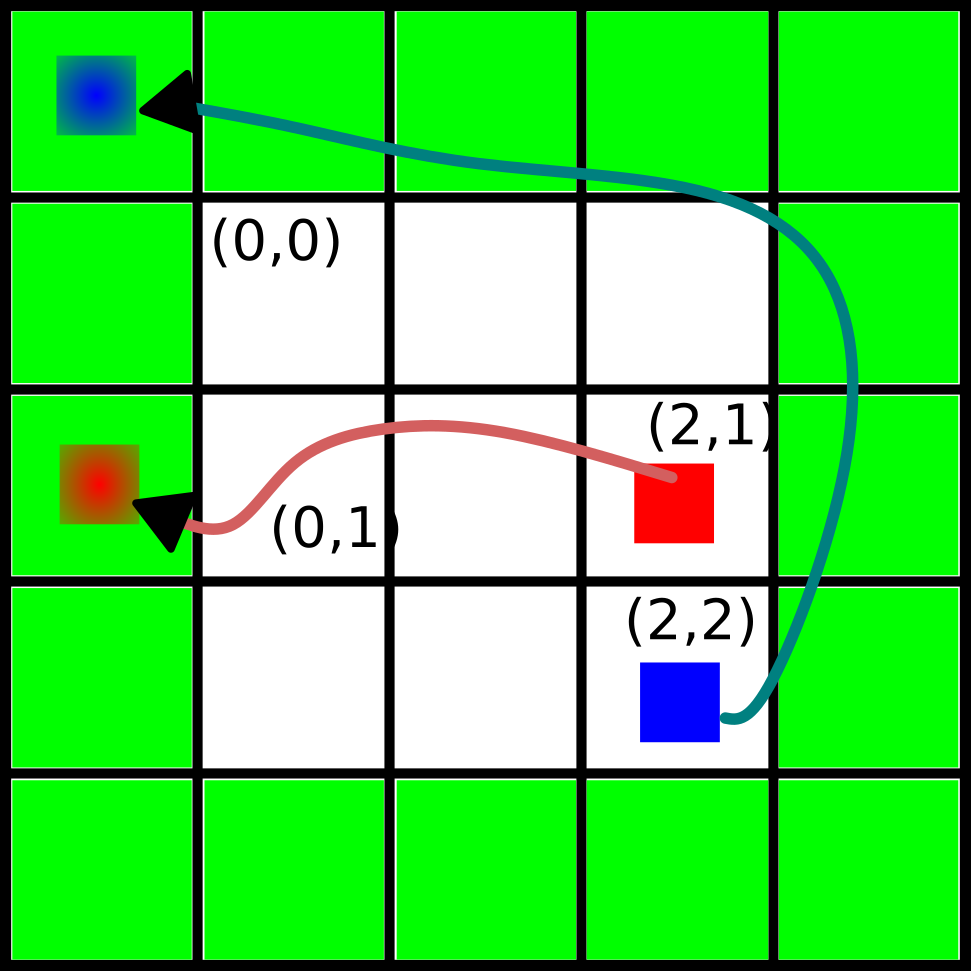
A fluid discretized at the white cells is surrounded by a single layer of ghost cells (green). In order to apply periodic boundary conditions we must carefully fill the ghost cells. For instance, in order for the cell  to access the information of the cell located to its left it is necessary for the ghost cell located there to store the information of the cell
  . Similarly the ghost cell at the top left corner must store the information in the cell
  .
.
Note
In order to ensure a single layer is enough we store the density, , the fluid velocity and the momentum, , across the whole domain. While storing the momentum everywhere is redundant doing this simplifies the implementation and facilitates the customization of the boundary conditions via the ghost cells.
It is useful to lay out a situation in which not storing the momentum explicitly can be problematic when using a single layer of ghost cells. In particular, there is an issue when trying to evaluate the divergence of the kinetic tensor,

at the border of the domain. Tensor divergence is defined elementwise (such that the result is a vector) as

For instance, the component will be defined at the same position as the velocity in the staggered grid sketch, that is .
Lets focus on the  component:

And now let us evaluate

In order to compute one element of a tensor (comping from two vectors) we interpolate the components at the same place. In this case the location  (where
  is located in the staggered grid when
  ).
).
Finally, let us compute  :
:

Think about the rightmost cell of the domain, if we do not store the momentum the algorithm will try to fetch  , which lies one cell to the right of the ghost layer and is of course invalid. One solution is to store the momentum separately, so the element is accessible in a ghost cell.
Usage
Use as the rest of the Integrator modules.
The following parameters are available:
real temperatureTemperature of the solvent in units of energy. This isin the formulas.
real shearViscosityShear viscosity of the solvent.
real bulkViscosityBulk viscosity of the solvent.
real speedOfDoundThe isothermal speed of sound is used in the default equation of state.
real hydrodynamicRadiusHydrodynamic radius of the particles (same for all particles).
real dtTime step.
real3 boxSizeThe domain size.
int3 cellDimNumber of fluid cells, if set the hydrodynamicRadius is ignored.
uint seed0 (default) will take a value from the UAMMD generator
std::function<real(real3)> initialDensity. A function to set the initial density, will be called for each point in the domain
std::function<real(real3)> initialVelocityX. A function to set the initial X velocity, will be called for each point in the domain
std::function<real(real3)> initialVelocityY. A function to set the initial Y velocity, will be called for each point in the domain
std::function<real(real3)> initialVelocityZ. A function to set the initial Z velocity, will be called for each point in the domain
#include"Integrator/Hydro/ICM_Compressible.cuh"
int main(){
  //...
  //Assume an instance of ParticleData exists
  //auto pd = std::make_shared<ParticleData>(numberParticles);
  //...

  using namespace ICM = Hydro::ICM_Compressible;
  ICM::Parameters par;
  par.shearViscosity = 1.0;
  par.bulkViscosity = 1.0;
  par.speedOfSound = 16; //For the equation of state
  par.temperature = 0;
  //par.hydrodynamicRadius = 1.0; //Particle hydrodynamic radius (used to determine the number of fluid cells)
  par.cellDim = {32,32,32}; //Number of fluid cells, if set the hydrodynamicRadius is ignored
  par.dt = 0.1;
  par.boxSize = {32,32,32}; //Simulation domain
  par.seed = 1234;
  //The initial fluid density and velocity can be customized:
  par.initialDensity = [](real3 position){return 1.0;};
  par.initialVelocityX = [](real3 position){return sin(2*M_PI*position.y);};
  par.initialVelocityY = [](real3 position){return 1.0;};
  par.initialVelocityZ = [](real3 position){return 1.0;};

  auto compressible = std::make_shared<ICM>(pd, par);

  //Now use it as any other integrator module
  //compressible->addInteractor...
  //compressible->forwardTime();
  //...
  return 0;
}
Here, pd is a ParticleData instance.
Note
As usual, any Interactor can be added to this Integrator, as long as it is able to compute forces.
Walls
By default the compressible ICM Integrator is triply periodic. The class ICM_Compressible_impl has a template parameter called Walls that can be customized to handle the ghost layers in the Z direction. In particular allowing to place walls at the domain limits.
Note
The Integrator called ICM_Compressible is an alias to ICM_Compressible_impl<Hydro::icm_compressible::DefaultWalls>.
The wall-handling class must abide to the following rules:
-
class ICMZWalls
A class with arbitrary name that will be used by
ICM_Compressible_implto handle the ghost cells in the Z direction. Note that this class can be ParameterUpdatable (for instance to model a moving wall).-
ICMZWalls()
Must provide a default constructor due to a technical restriction.
-
__host__ __device__ bool isEnabled();
If the domain is periodic in Z, this must return false. Otherwise return true.
-
__device__ void applyBoundaryConditionZBottom(FluidPointers fluid, int3 ghostCell, int3 n);
This function applies the boundary conditions at the bottom z wall for the fluid for a given ghost cell.
-
__device__ void applyBoundaryConditionZTop(FluidPointers fluid, int3 ghostCell, int3 n);
This function applies the boundary conditions at the top z wall for the fluid for a given ghost cell.
-
ICMZWalls()
For an usage example you can check the file test/Hydro/ICM_Compressible/walltest.cu, which encodes a moving wall at the bottom.
The default wall class in ICM_Compressible.cuh is not enabled and can serve as an example as well.
- An additional parameter is present in
ICM_Compressible_implto allow to provide an instance of the Wall handler: std::shared_ptr<Walls> walls. If present, this object will be used to handle the ghost layers in the Z direction.
FAQ
- 1- I want to fiddle with the boundary conditions:
-Check the file
ICM_Compressible/GhostCells.cuh, which handles the filling of the ghost layer. You might also want to check theICM_Compressible/Fluctuations.cuh, which among other things handles the ghost layer for the fluctuations. Finally, if particles are involved, you will probably need to modify the spreading kernel (see below).-Walls can be placed in the Z direction and customized via a template parameter (or by modifying the default wall class in
ICM_Compressible.cuh). See Walls above.-You can also influence the solver itself (for instance to define special rules for the surfaces of the domain) in the functions of the file
ICM_Compressible/FluidSolver.cuh.- 2- I want to change the spreading kernel:
-Change the line “using Kernel” below to the type of your kernel. You might also have to change the initialization in the spreading and interpolation functions in ICM_Compressible.cu. You will also have to change the relation between the hydrodynamic radius and the number of fluid cells, do this in the ICM_Compressible constructor.
- 3- I want to add some special fluid forcing:
-The function addFluidExternalForcing in ICM_Compressible.cu was created for this.
- 4- I want to change the equation of state:
-Check the struct DensityToPressure in ICM_Compressible.cuh.
Incompressible Inertial Coupling Method
In the incompressible scheme density is constant and the divergence of the velocity is null, simplifying the equations to

This scheme uses the same staggered grid spatial discretization as the compressible scheme and solves the equations in a triply periodic environment.
We can rewrite the incompressible Navier-Stokes equation above as

Where we have introduced a new fluid forcing,

that includes the advective and diffusive terms to simplify the notation.
The projection operator,  , is formally defined as

Finally, the external fluid forcing  is defined as

We apply the projection operator in Fourier space, as we did in, for instance the Force Coupling Method. Since we now have to solve the temporal variation of the velocity and we have non-linear terms, the diffusive and advective terms will be evaluated in real space. In the ICM, the divergence of the noise is also evaluated in real space.
We use a second-order accurate predictor-corrector scheme for temporal discretization. We can discretize the coupled fluid-particle equations as
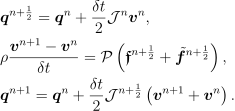
Which requires evaluating the non-linear fluid forcing terms at mid step (i.e advection and diffusion). The convective term is discretized using a second order explicit Adams-Bashforth method (Eq. 35 in [4] ),

Advection is therefore stored each step to be reused in the next. The diffusive term is similarly discretized to second-order by

Replacing both equations and solving for the velocity at time leads to the full form of the velocity solve, depending only on the velocity from previous time steps
![&\vec{\fvel}^{n+1} = \tilde{\oper{P}}\vec{g}^n =\tilde{\oper{P}}\Big[ \left(\frac{\rho}{\dt}\mathbb{I} + \frac{\eta}{2}\nabla^2\right)\vec{\fvel}^n- \\
& \frac{3\dt}{2} \nabla\cdot (\vec{\fvel}\otimes\vec{\fvel})^n - \frac{\dt}{2} \nabla\cdot (\vec{\fvel}\otimes\vec{\fvel})^{n-1}+\\
&\oper{S}\vec{F}^{n+\half} + \nabla\cdot\mathcal{Z}^n \Big],](../_images/math/32e0d5f8095a0ddf6385cce269847f336a4db21d.svg)
where the modified projection operator is defined as
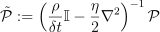
and is applied in Fourier space.
- The full algorithm can be summarized as follows:
Take particle positions to time
 :
:  .
.Spread forces on particles to the staggered grid:
 .
.Compute and store advection:
 .
.Compute the rest of the terms in
 , using the advective term just computed in addition to the one stored in the previous step.
Take
to Fourier space and apply  :
:  .
.Take
 back to real space.
Evaluate particle positions at
by interpolating:  .
.
We use the discrete form of the differential operators for a staggered grid (see About Staggered grids).
Usage
Usage of the ICM Integrator requires a list of the familiar parameters for hydrodynamics thus far plus the fluid density, which is constant.
The following parameters are available:
real temperatureTemperature of the solvent in units of energy. This is
real viscosityShear viscosity of the solvent.
real densityDensity of the solvent.
real hydrodynamicRadiusHydrodynamic radius of the particles (same for all particles).
real dtTime step.
Box boxThe domain size.
int3 cellsNumber of fluid cells, if set the hydrodynamicRadius is ignored.
uint seed0 (default) will take a value from the UAMMD generator
bool sumThermalDrift = falseThermal drift has a neglegible contribution in ICM (and formally null), but can still be computed via random finite differences if desired.
bool removeTotalMomentum = trueSet the total fluid momentum to zero in each step
#include<uammd.cuh>
#include<Integrator/Hydro/ICM.cuh>
int main(){
  //...
  //Assume an instance of ParticleData exists
  //auto pd = std::make_shared<ParticleData>(numberParticles);
  //...
  Hydro::ICM::Parameters par;
  par.temperature = 1.0;
  par.viscosity = 1.0;
  par.density = 1.0;
  par.hydrodynamicRadius = 1;
  par.dt = 0.01;
  par.box = Box({32, 32, 32});
  auto icm = std::make_shared<Hydro::ICM>(pd, par);
  //Now use it as any other integrator module
  //icm->addInteractor...
  //icm->forwardTime();
  //...
  return 0;
}
Here, pd is a ParticleData instance.
Note
As usual, any Interactor can be added to this Integrator, as long as it is able to compute forces.
References: